Do you know what we use cookies for?

We collect data on your browsing behaviour using our own and third-party cookies, which we will use to analyse your browsing in order to improve both the website's features and the products and services we offer you, to manage the advertising spaces, and to customise our range of products and services based on your browsing habits and the contents viewed. Read all the information on how we use cookies in our Cookie policy.

Set up cookies
Reject
Accept
  • Personal Banking
  • Business Banking
  • EN
    Spanish language. Press to change

    Spanish language. Press to change

    Close
    • Spanish
    • Català
    • Euskera
    • Galego
    • Valencià
    • Deutsch
    • English
    • Français
Open account

CaixaBank (Go to home)

Access Open account

CaixaBank (Go to home)

Open your account Access
 
  • ...Searching!

    Soon we will show results

  • Follow your search

    More results

Promoted product

How to enable notifications in the CaixaBank app

Enable notifications

Pause / Resume

How to enable notifications in the CaixaBank app

Enable notifications

Promoted product

Enable notifications to stay up to date with your everyday banking

Notifications are alerts that you receive on your mobile through the CaixaBank app to inform you about your daily activity. They also help keep you protected against potential fraud.

You will also be able to...

Complete your online purchases easily

Receiving security alerts if any unusual operation or transaction occurs, or any other abnormal situation

Receiving alerts about the activity on your accounts and cards, or other products

Receive relevant information about CaixaBank
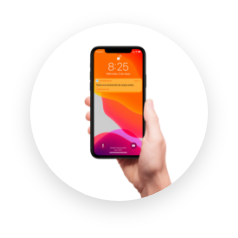
Remember that notifications are sent through the CaixaBank app, so you will always know that it is CaixaBank who is contacting you. Notifications are the safest and most reliable way to keep you informed.

Enable them in a flash

Sign in to the CaixaBank app and follow the steps below.


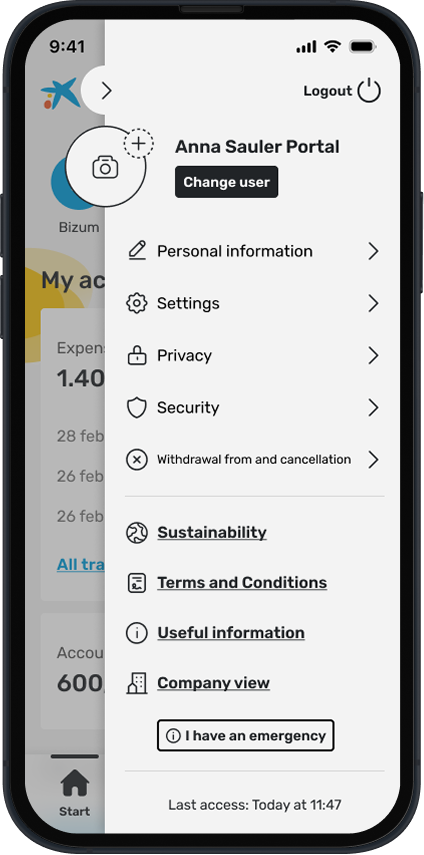
Tap on “Profile” and then “Settings”.


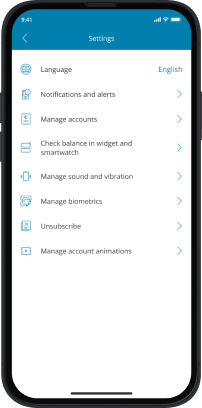
Go to "Notifications and alerts".


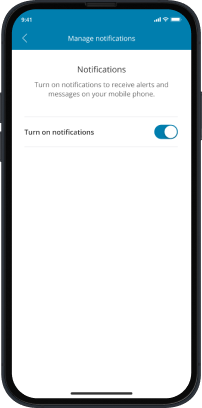
Tap on "Manage notifications".
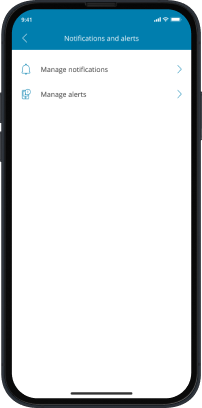


Enable notifications and accept the operating system permissions. And now you can receive any alert from the CaixaBank app!

Downloading the app is that easy


    • Contact us Got a question? We’re here to help you.
    • Customer support Access to submit an official complaint.
    • Online banking From your computer or your phone.
    • Set an appointment Through the CaixaBank app or website.
  • Products

    • HolaBank Account
    • HolaBank Cards
    • HolaBank Mortgage
    • Interest-bearing Deposit
    • Insurance
  • It may interest you

    • Digital Banking
    • HolaBank Club (Opens in a new window)
    • Moments Discounts
    • Sustainable products
  • Corporate information

    • Corporate website (Opens in a new window)
    • CaixaBank Research (Opens in a new window)
    • Awards and acknowledgements (Opens in a new window)
    • Headlines
    • Sustainability (Opens in a new window)
    • Work with us (Opens in a new window)
    • Accessibility
    • CAS
    • CA
    • ENG
    • FRA
    • DEU
    • VAL
    • EUS
    • GAL

© CaixaBank, S.A. 2025

  • Cookies policy
  • Privacy
  • Legal notice
  • Interest rates and information
  • MIFID
  • Legal information about CaixaBank, S.A.
  • Sello de Excelencia EFQM (Abre en ventana nueva)
  • Western Europe
  • Banco más innovador (Abre en ventana nueva)
  • Certificación ISO
  • AQmetrix

Enable notifications in the CaixaBankNow

Cerrar

Enable notifications in the CaixaBankNow

Enable notifications