Before continuing, let us explain what we use cookies for. This CaixaBank website collects data on your browsing using its own and third-party cookies, which we analyse to:

  • Improve our website, products and services.
  • Customise the content (e.g., with video recommendations for you).
  • Customise the advertising you see for our products or services.

The content and advertising are personalised using a profile of you created from your browsing data (for example, what sections of our site you visit). You can find out more about how we use cookies in our Cookie Policy.

Set up cookies
Reject
Accept
  • Personal Banking
  • Business Banking
  • EN
    Spanish language. Press to change

    Spanish language. Press to change

    Close
    • Spanish
    • Català
    • Euskera
    • Galego
    • Valencià
    • Deutsch
    • English
    • Français
Open account

CaixaBank (Go to home)

Access Open account

CaixaBank (Go to home)

Open your account Access
 
  • ...Searching!

    Soon we will show results

  • Follow your search

    More results

How to request a refund of a card payment

Pause / Resume

How to request a refund of a card payment

How do I submit a refund request?

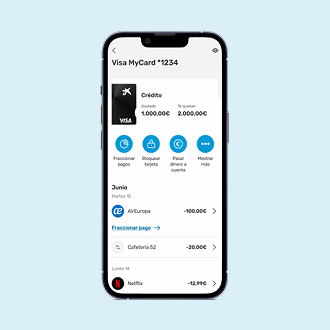
Through your CaixaBankNow digital banking (app or website) you can request a refund for transactions that have been charged to your card and which you do not agree with. You can also go to your Caixabank branch.

0
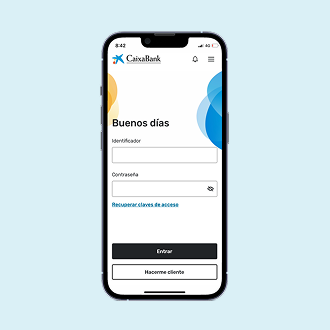
Access the CaixaBankNow app

You must enter your username (ID no. without the letter) and password. You can also do it with your fingerprint.

1
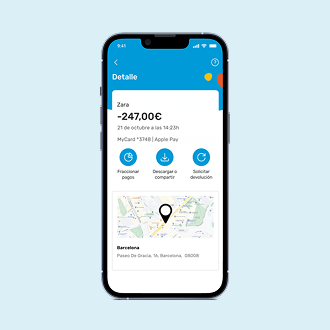
Select the transaction

In "My cards", select the card linked to your request. The latest transactions will be displayed. Click on the transaction you wish to request the refund for.

2
Request the refund

Once the operation has been selected, click on the "Request refund" button located at the end of the screen.

3
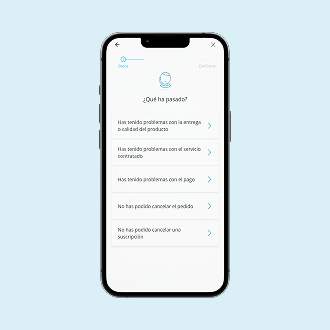
Answer the questions

Select the option which best describes your case and answer some questions. We recommend you provide detailed information on what happened to be able to move forward with your request.

4
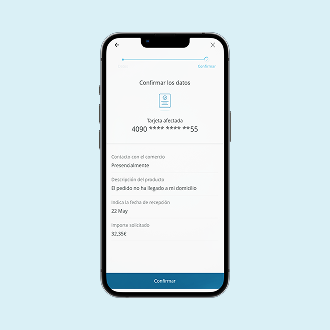
Confirm the request

Click on the "Confirm" button located at the end of the screen.

Once the refund has been requested, we will keep you informed by email of the progress of your request until the final outcome of your case.

IMPORTANT:

Any information or evidence you can provide will be of great help to us as it will enable us to move forward faster with your application.

If you are requesting a refund for transactions that you do not recognise, for security reasons we will block your card. You can continue to use your other CaixaBank cards and request a new one.

    • Contact us Got a question? We’re here to help you.
    • Customer support Access to submit an official complaint.
    • Online banking From your computer or your phone.
    • Set an appointment Through the CaixaBank app or website.
  • Products

    • HolaBank Account
    • HolaBank Cards
    • HolaBank Mortgage
    • Interest-bearing Deposit
    • Insurance
  • It may interest you

    • Digital Banking
    • HolaBank Club (Opens in a new window)
    • Sustainable products
  • Corporate information

    • Corporate website (Opens in a new window)
    • CaixaBank Research (Opens in a new window)
    • Awards and acknowledgements (Opens in a new window)
    • Headlines
    • Sustainability (Opens in a new window)
    • Work with us (Opens in a new window)
    • Accessibility
    • CAS
    • CA
    • ENG
    • FRA
    • DEU
    • VAL
    • EUS
    • GAL

© CaixaBank, S.A. 2025

  • Cookies policy
  • Privacy
  • Legal notice
  • Interest rates and information
  • MIFID
  • Legal information about CaixaBank, S.A.
  • Sello de Excelencia EFQM (Abre en ventana nueva)
  • Western Europe
  • Banco más innovador (Abre en ventana nueva)
  • Certificación ISO
  • AQmetrix